


Really quick post today, in starting to use coding agents more, I found myself having to launch the Claude Code CLI multiple times a day (opening a command prompt, navigating to my development directory, and starting Claude Code). Here’s a shortcut I use to do that faster.
1) Find an open place on your desktop and right click -> New -> Shortcut:
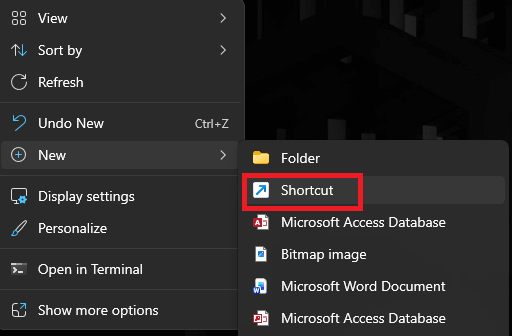
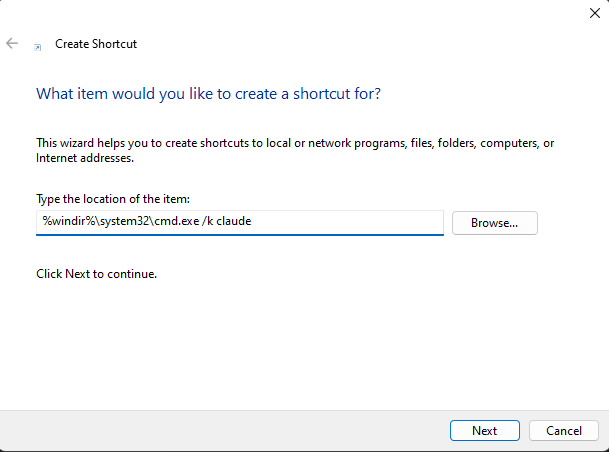
2) In the ‘Create Shortcut’ dialog, for the location of the item put the following:
- %windir%\system32\cmd.exe /k claude
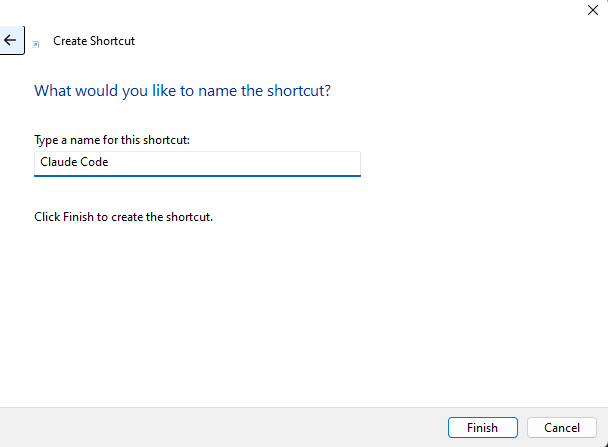
3) Give the new shortcut a name
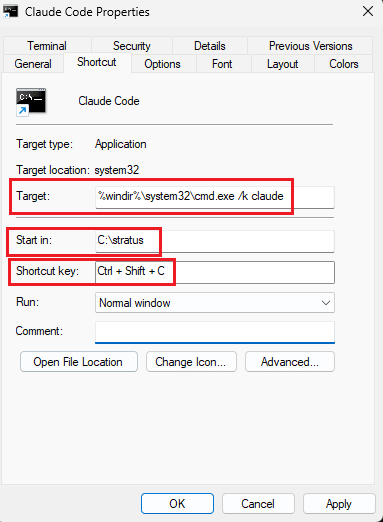
4) Once created, right click on the shortcut and go to Properties
In here you will see:
- The ‘Target’ is set to the filepath and command you set above
- For the ‘Start In’ set the file path of your code directory you want Claude to launch in
- You can also add a shortcut key combination to automatically execute this shortcut straight from your keyboard
5) Click Apply and then Ok
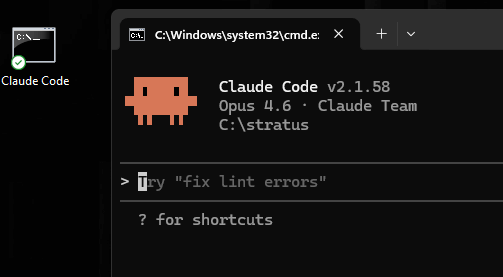
6) Test out your shortcut to make sure it works – double clicking on the shortcut or using your shortcut key combination should both launch Claude Code in the specified directory
Has anyone else ran into this? How have you solved it?