

Microsoft recently changed some key aspects of their licensing framework and enforcement with an update in September 2025, let’s take a look at what has changed and how it will impact your organization.
Resources
Dynamics 365 Licensing Resources
Dynamics 365 Finance and Operations Apps Security Role FAQ
Key Takeaways
#1 – License Enforcement Has a New Date
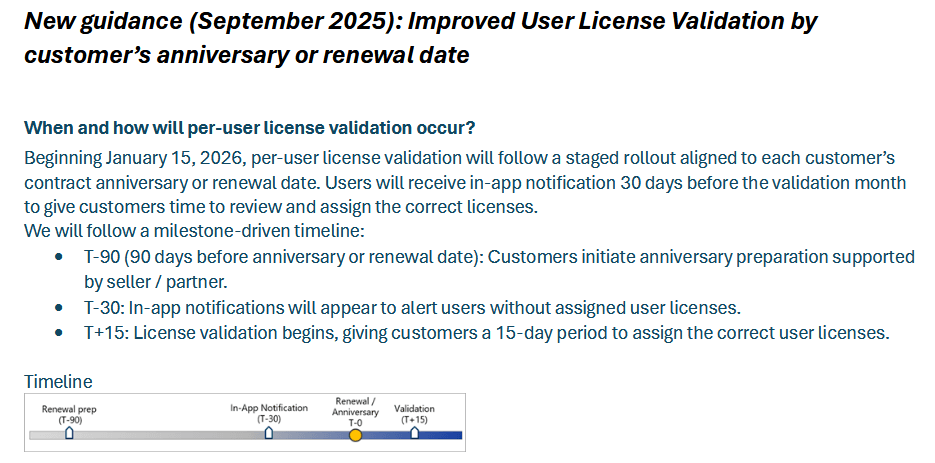
Probably the biggest announcement is the postponement of license enforcement from November 1st, 2025 to align with the a D365 customer’s contract anniversary or renewal date. This change will start on January 15, 2026 with ‘soft enforcement’ happening 30 days prior to the actual enforcement date, with the ‘hard enforcement’ happening 15 days after the contract / renewal date.
#2 – Additional Licensing Enforcement Call Outs
- License validation is performed at the tenant level, if a customer has multiple tenants each tenant could potentially have its own validation start date.
- A separate license is required for each tenant a user has access to
- A separate license is not required for multiple production instances under the same tenant
- If your organization has a license renewal date before January 15th 2026, you will move to the new user license validation model at your next contract renewal date.
- Users assigned the SysAdmin role do not require a license
- B2B guest users must be licensed like any other user – even if they are from another domain / tenant
- Service accounts do not require a license as long as they are not assigned roles that provide ‘interactive or business functionality’.
- Multiplexing rules still apply – if an external user accesses D365 data through an application / automation they must be assigned the appropriate license as if they accessed that data within the application itself
#3 – Environment Type Enforcement
Not all environment types will have license enforcement enabled, license enforcement will only impact Microsoft managed production environments, this means deployments like government cloud or China cloud are not impacted at this time.
| Customer Hosted (Not Reported) | Microsoft Managed |
| VHD / VM images | Unified Developer Environment (managed via PPAC) |
| Cloud Hosted Environments | Unified Sandbox Environment (managed via PPAC) |
| Local Business Data (D365 on-prem) | Sandbox Tier 2 / 3 / 4 / 5 (in scope for reporting) |
| Production (managed via LCS or PPAC)
In scope for reporting, notification, and enforcement |
#4 – Grace Period for Renewals Scheduled from April to September 2025
If your license renewal falls between April 1st and Sept 30th 2025 you will receive a ‘grace period’ for 12 months from your renewal date until license enforcement is applied.
During this period, all users will be able to access D365 regardless of their license requirements / assignment.
This grace period does not forgive non-compliance for unlicensed usage. Microsoft specifically calls out the ability to back-bill customers if they are not licensed correctly.
At the end of the grace period, the same timeline of license enforcement from above applies. Microsoft also specifically states that no extensions will be given.
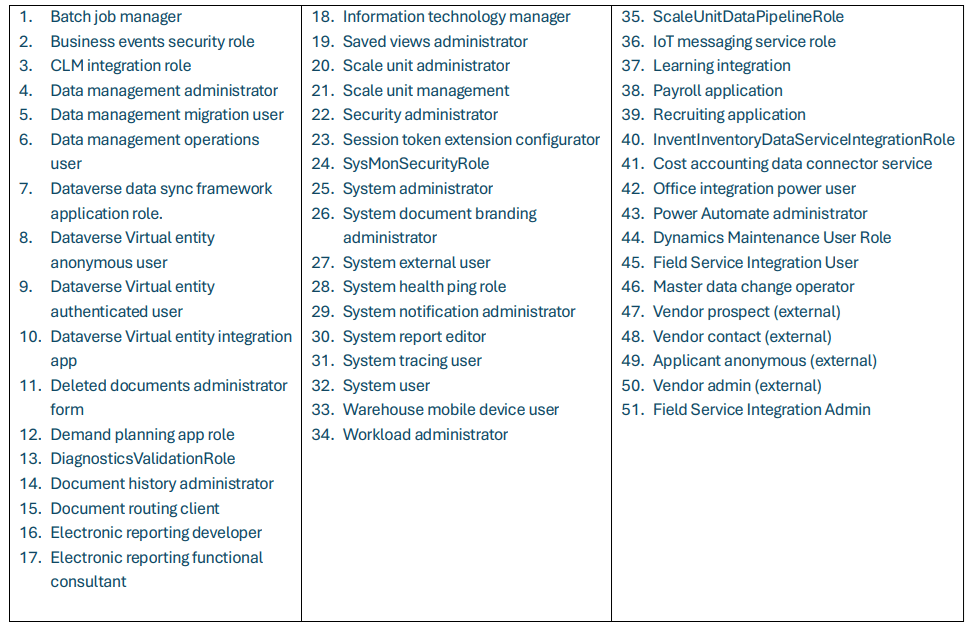
#5 – Roles That Do Not Require a License
Microsoft has listed a series of out of the box roles that do not require a license be assigned to a user. Please note that if you clone or modify these roles that the roles will then require a license based on the objects assigned to the role.
#6 – Current Known Issues (Sept 2025)
- License exports from PPAC or LCS fail to download
- Possible root causes:
- Datasets are too large
- Browser pop-up blocker
- Report generation times out silently in the background
- Possible fixes
- Clearing browser cache before exporting
- Waiting 24 hours to try the export again
- If you are experiencing this issue and have tried the fixes, Microsoft recommends opening a support ticket
- Possible root causes:
- Users assigned access via Entra ID group membership are not being reported correctly
- Estimated fix – end of Oct 2025
- Tenants that have multiple email domains (eg: @contoso.com and @contososubsidiary.com) are not being correctly counted
- Estimated fix – Nov 1st 2025
Conclusion
While there are still a lot of moving parts to D365 licensing we are starting to get more answers surrounding user licensing and enforcement.
Even with the postponement of the license enforcement date, my recommendation for all clients is to start the license analysis process to ensure that whenever your renewal is that you are ready to be compliant to avoid any disruptions in application usage.
If you have any questions on this or would like to look at tools to help automate this process please feel free to reach out.
Do you know of a sure fire way to determine our “renewal” date?
We’ve licensing from a CSP, 3 year commit, pay monthly, however I can’t believe that we’ll escape the enforcement action until 2027 when this is due to renew.
It’d be incredibly helpful if MSFT displayed this in FNO so that we had something to target rather than waiting for the 30 day warnings to appear.
Sam,
You can find your Dynamics 365 renewal date in the Microsoft 365 admin center (admin.microsoft.com) under Billing > Subscriptions, where you’ll see the next renewal or expiration date; alternatively, if you purchased through a reseller or a specific solution, check the partner portal, your email confirmations, or use in-app contract management tools for detailed contract specifics.
For Direct Microsoft Purchases (Admin Center):
Sign in to the Microsoft 365 admin center (admin.microsoft.com) using your Global or Billing Admin account.
Navigate to Billing > Subscriptions.
Select the specific Dynamics 365 subscription.
Look for the “Subscription details” or “Contract details” section, which will show the start, end, and renewal dates.
For Reseller Purchases:
Your reseller manages the renewal; contact them directly or check your partner portal, as they handle the billing and renewal process for you.
For Specific Dynamics 365 Apps (e.g., Finance, Marketing):
Within the app, as an admin, go to the Admin Center > Billing > Subscriptions (as above).
For complex contract management, look for solutions like ProContract 365 from Microsoft AppSource or similar apps that track renewal dates within the D365 environment itself.
Hi All!
Has anyone started having the licensing being enforced or warned? We are trying to get some details on what that piece actually looks like and would like to get some insight. Particularly how in depth the check is. We are working to align all of the proper licenses but don’t currently have them. Is it only checking for a base license or is it checking to make sure it’s the correct base and correct attach licenses?
Thanks!
Ben
From my experience, there are users that are starting to see the warning messages and having actual license ‘validation’ / ‘enforcement’ being applied.
The check is validating both base and attach licenses from what I have seen, but curious what others are seeing as well.